How I Built a Self-Hosted AI Project-Management Bot for Discord
A step-by-step guide to running an AI agent as a Discord bot on your own server, built for my Dallas AI project team: tasks, meeting notes, recurring Google Meets, plus the two silent failures that cost me an afternoon and how I found them.

I'm on a nine-person team in the Dallas AI builder program. Nine people, one project, and the same problem every group of nine has. Decisions happen in chat and evaporate. Action items get a verbal nod and no owner. Someone asks "wait, when is the meeting again?" for the fourth time. The usual fix is a SaaS bot you bolt onto Discord, hand your data to, and pay per seat.
I went the other way. I gave the team a single AI agent, named DAL-AI, that lives in a Docker container on a server I own. It reads the project's Discord channels, files tasks to a database, captures meeting notes, and schedules recurring Google Meets with the whole team invited. It answers "what did we decide about X" by actually looking. No per-seat pricing, no third party holding the conversation history, and the marginal cost of adding it to a box that was already running was close to zero.
This is the same pattern I use for running marketing operations on infrastructure I control. Below is the full build as a step-by-step guide, then the two failures that nearly convinced me the whole thing was broken.
What it does
DAL-AI is one AI agent wearing a few hats for the Dallas AI team:
- Task tracking. When someone commits to something in chat, or an action item falls out of a meeting, it files a task to a database with an owner and a due date.
- Meeting notes. Paste a transcript and it extracts decisions, blockers, and action items, then writes the record and creates the follow-up tasks.
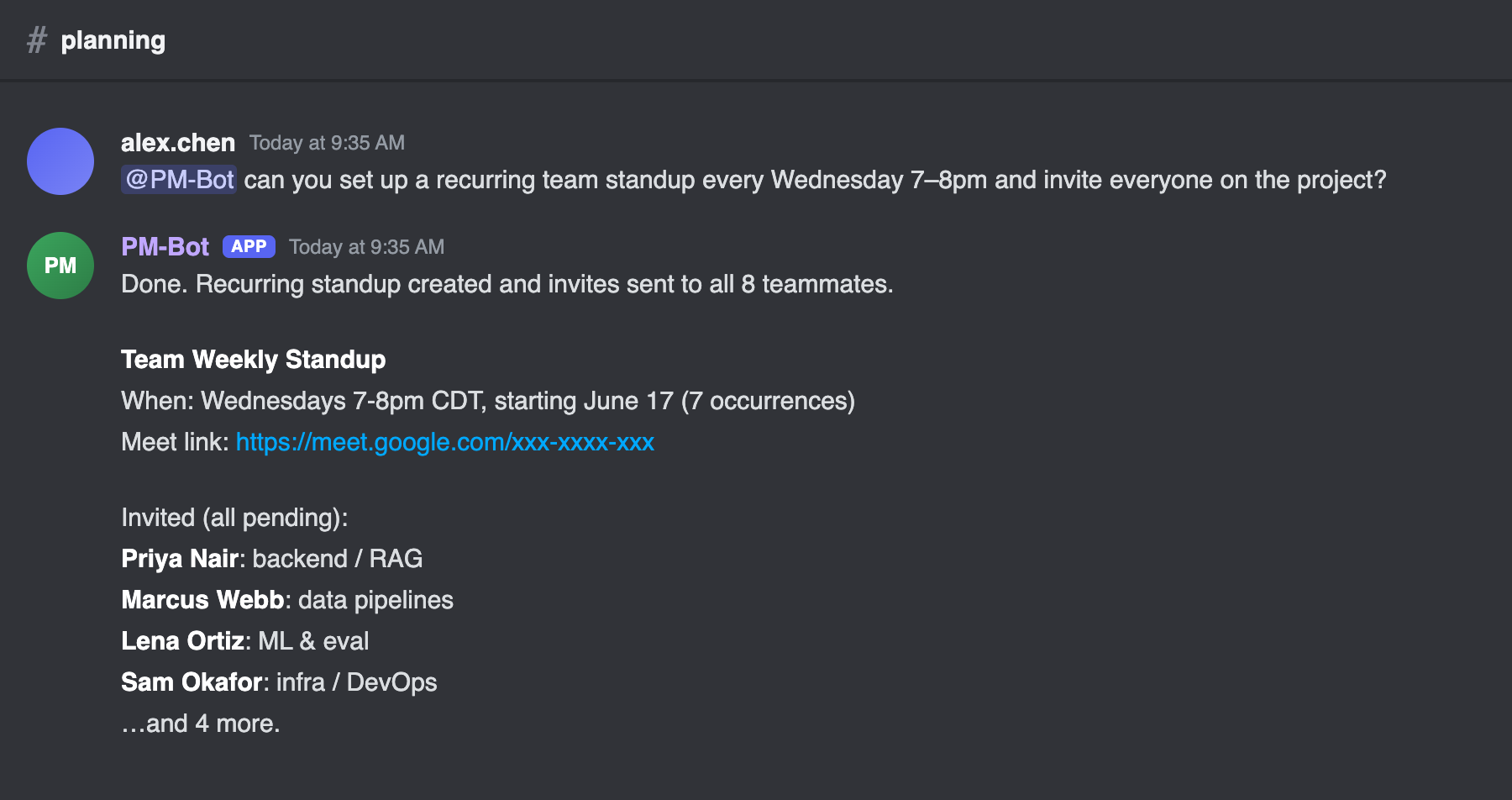
- Scheduling. Ask in plain language and it creates calendar events, including recurring ones, attaches a Google Meet link, and invites the whole team by email.
- Institutional memory. It checks Discord history, then the task database, then the calendar before it tells anyone something is not on record.
Here is what that looks like from the team's side. A teammate asks, the bot does the work and reports back in plain text. (The screenshots in this post use placeholder names. My actual teammates' names and emails stay off the public internet.)
The architecture
The whole thing is one agent runtime in a Docker container on a headless Linux box. I run a small fleet of self-hosted services this way, so adding one more container was a non-event. The agent connects to Discord on one side and to its tools on the other.
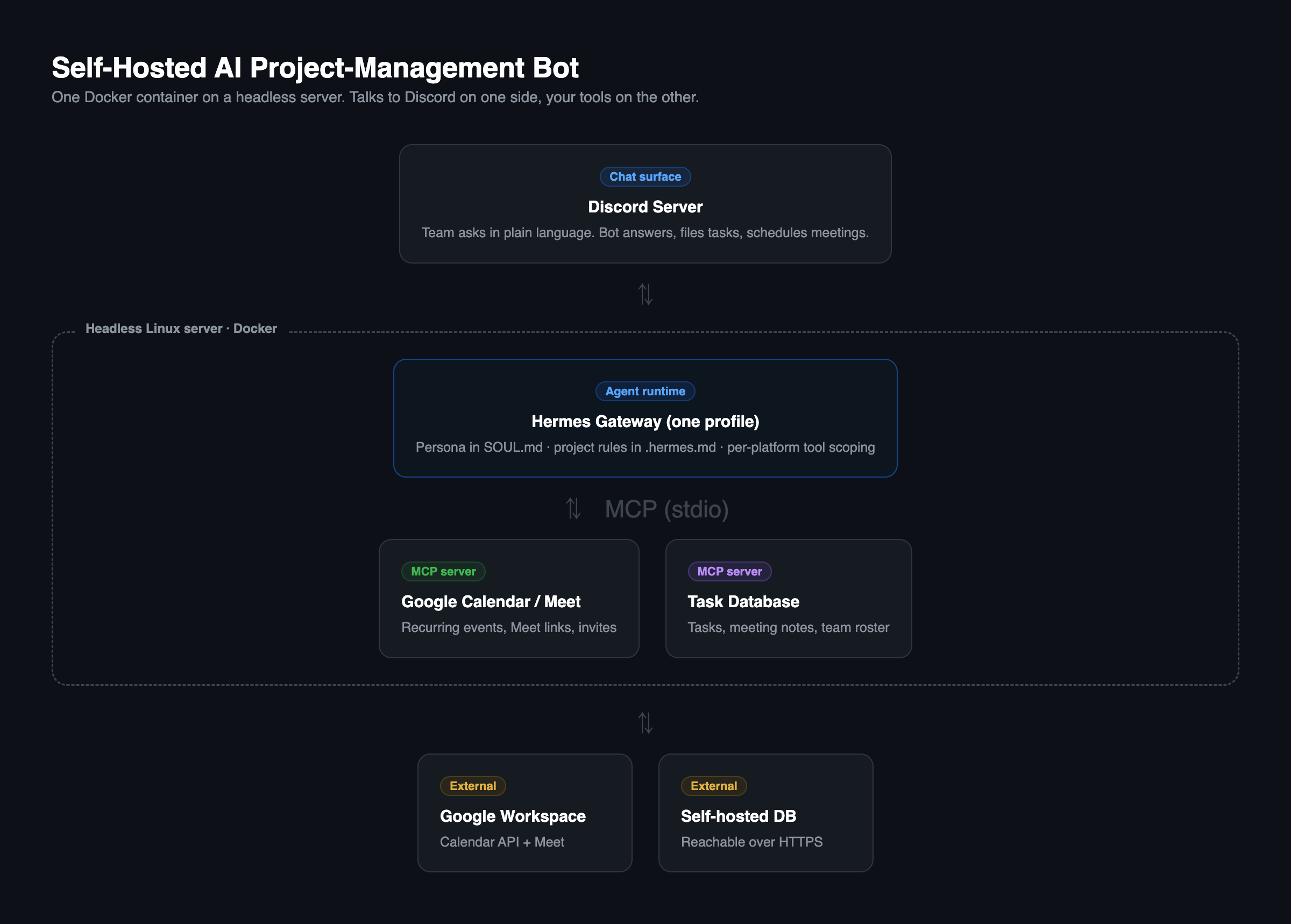
The runtime is Hermes, an open agent framework that ships a Discord adapter and separates the agent's persona from its project instructions. The model behind it is swappable. I ran a fast, inexpensive hosted model, which matters for a chatty bot that responds dozens of times a day.
The important part is the tools. The agent does not talk to Google Calendar or the database directly. It talks to MCP servers: small programs that expose a specific API as tools the agent can call. One wraps Google Calendar and Meet. One wraps the task database. The agent sees "create a calendar event" and "create a task," and never touches a credential.
Why bother self-hosting instead of grabbing an off-the-shelf bot? Three reasons. Your conversation data stays yours, which matters when the chat is a team's strategy and half-formed ideas. It composes, because adding a capability means adding an MCP server, not waiting on a vendor roadmap. And the cost is the electricity. The catch is that you own the failures too, which is the back half of this post.
Prerequisites
Two things have to exist before the build below makes sense, and each is fiddly enough to deserve its own walkthrough:
- A Discord bot identity to log in as: the application, the token, and the two privileged intents that fail silently if you skip them. How to create a Discord bot for an AI agent.
- A running Hermes agent with Google access: the install, an isolated profile, and the Google OAuth refresh token that calendar access quietly depends on. Standing up a Hermes agent.
Got those? Here is the build that ties them together.
The build, step by step
This section assumes you are comfortable with Docker, a terminal, and reading error messages. If that is not you, the overview above is the part that matters.
Step 1: Create an isolated agent profile
Keep this agent's identity, memory, and config separate from anything else you run. In Hermes that is a profile:
hermes profile create dallas-ai --cloneEverything that follows lives in that profile's directory, which you mount into the container so it survives rebuilds.
Step 2: Write the Dockerfile (and install the right extras)
This is the line that will bite you later if you get it wrong, so get it right now. The runtime needs two optional extras: one for chat platforms, one for MCP tool support.
FROM python:3.11-slim
# install node for the MCP servers, plus the agent runtime
RUN pip install --no-cache-dir -e .[messaging,mcp]
CMD ["hermes", "-p", "dallas-ai", "gateway", "run"]
The messaging extra gives you Discord. The mcp extra is what lets the gateway speak to tool servers at all. Leave it out and everything looks configured but no tool ever works. More on that in the troubleshooting section, because that is exactly the mistake I made.
Step 3: Build your MCP servers as self-contained bundles
Each tool server is a small Node program. The trap: if you compile it the obvious way and copy only the compiled output into the container, it will crash, because the compiled code still imports its dependencies at runtime and the container has none.
Bundle each server into a single self-contained file with dependencies inlined. With esbuild that is one build script:
import { build } from "esbuild";
await build({
  entryPoints: ["src/index.ts"],
  bundle: true,
  platform: "node",
  format: "esm",
  packages: "bundle", // inline dependencies, do not leave them external
  outfile: "dist/index.js",
  // lets bundled CommonJS deps call require() under ESM
  banner: { js: "import { createRequire } from 'module'; const require = createRequire(import.meta.url);" },
});
The result runs anywhere, with or without its original node_modules.
Step 4: Register the tool servers in the agent config
Point the agent at each server and inject its credentials from the environment. Never hardcode secrets here:
mcp_servers:
  google-workspace:
    type: stdio
    command: /usr/bin/node
    args: ["/srv/mcp/google-workspace/dist/index.js"]
    env:
      GOOGLE_CLIENT_ID: ${GOOGLE_CLIENT_ID}
      GOOGLE_CLIENT_SECRET: ${GOOGLE_CLIENT_SECRET}
      GOOGLE_REFRESH_TOKEN: ${GOOGLE_REFRESH_TOKEN}
  task-db:
    type: stdio
    command: /usr/bin/node
    args: ["/srv/mcp/task-db/dist/index.js"]
    env:
      DB_URL: ${DB_URL}
      DB_API_KEY: ${DB_API_KEY}
The actual secrets live in an environment file the container loads at runtime, never in the repo.
Step 5: Scope the toolset down for a chat surface
This step is about safety, and it is not optional for a bot that listens to a semi-public channel. The agent ships with powerful tools: running shell commands, scheduling its own background jobs, browsing the web. A project bot needs almost none of that. Turn off everything the job does not require, scoped to the chat platform:
hermes tools disable cronjob terminal browser code_execution --platform discordNow a teammate cannot talk the bot into running a shell command, and the bot cannot invent a background job to work around a limitation. Smaller toolset, smaller attack surface, sharper prompt.
Step 6: Split persona from project instructions
The single best structural decision was separating what the agent is from what the project needs. Hermes loads two files:
- The persona file is identity and voice, stable across everything: "You are a project manager. Be specific. Flag blockers proactively. Never dump raw output into chat."
- The project context file is the operational detail: the task database IDs, the team roster and emails, the tool conventions, the order to check sources in.
Keep them apart. The volatile project detail lives in one place and the identity stays clean. A bonus I learned the hard way: with a fast, cheap model, write the rules as if the model has no judgment, because it has less than you think. "Format nicely" got ignored and the bot pasted raw data tables into Discord, which does not even render them. "Never use tables, never paste raw output, list items one per line" worked.
Step 7: Verify the tool connections before you trust anything
Do not assume a config that says "enabled" actually connects. Test each server:
hermes mcp test google-workspace
hermes mcp test task-db
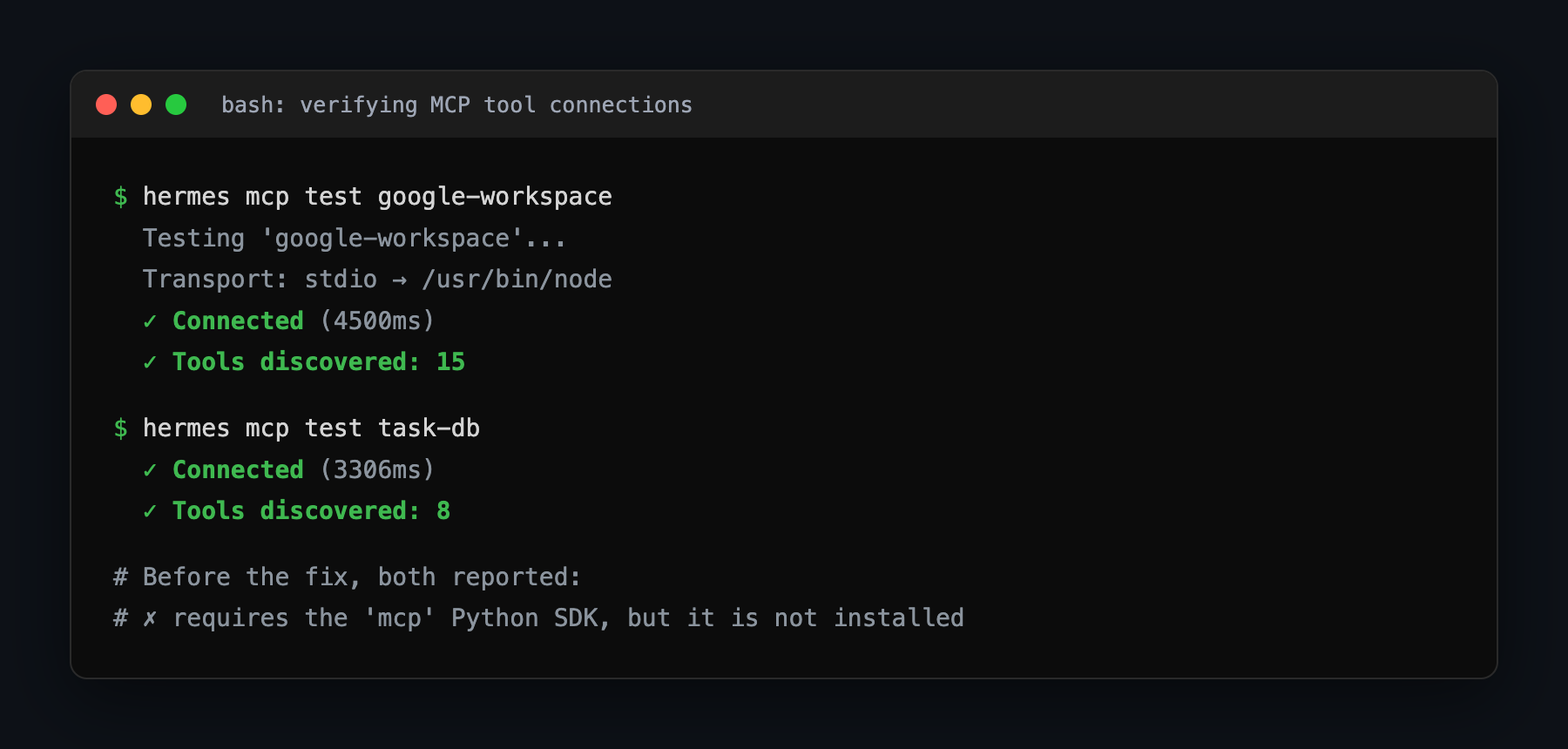
You want to see a real connection and a tool count, not just "configured":
Then prove the agent can actually call them end to end with a one-shot query:
hermes chat -Q --yolo -q "List the calendars and the task databases you can access. Report exactly what the tools return."If that comes back with your real calendars and databases, you are done. If it does not, welcome to my afternoon.
Troubleshooting: the afternoon Dallas AI's bot insisted it was blind
Everything above is the clean version. Here is what actually happened, because the failures were silent and both sent me hunting in the wrong place.
DAL-AI worked in Discord, answered questions, read channels. But every time a teammate asked it to schedule the weekly standup, it apologized and said it had no Google Calendar access, then asked someone to go through an OAuth authorization flow. The credentials were valid. I had checked them three times. It also kept doing strange things: dumping raw command output into the channel, referencing tools and skills that did not exist, trying to write little scripts to do work it should have had a tool for.
My first instinct was wrong. I assumed the bot was confused and kept editing the persona file: "you have calendar access, use the calendar tool, stop asking for OAuth." Nothing changed. That is the first lesson: when an agent says it cannot do something, check the tool layer before you touch the prompt. A model that has no tool will happily invent reasons it cannot help, and no amount of prompting gives it a tool it does not have.
Once I stopped editing prose and started testing the plumbing, I found two separate root causes stacked on top of each other.
Failure one: the gateway could not speak the tool protocol at all. The config listed the tool servers as enabled. They were not connecting. The runtime is the MCP client, and to speak the protocol it needs a specific software package that the default install does not include. I had installed it with the chat extra but not the tool extra (the mcp from Step 2). So the gateway could not connect to any tool server, fell back to guessing, and reported "no access." The tell was running the connection test instead of trusting the config listing: it printed the real error immediately, "requires the mcp package, not installed." One line in the Dockerfile fixed it.
Failure two: the tool servers crashed the instant they launched. With the client fixed, the servers started and died with a "module not found" error. I had compiled them and shipped only the compiled output into the container, but that output still needed its dependencies at runtime and the container had none. On my own machine it worked, because the dependencies were sitting right there. The container was the honest test. The fix was Step 3: bundle each server into a self-contained file. After that, the same connection test went from a hard error to "Connected, 15 tools discovered," and DAL-AI scheduled the standup on the first try.
Both failures share a shape worth remembering. "Enabled" is not "connected," and "runs on my machine" is not "portable." The config will lie to you about the first; your laptop will lie to you about the second. Test the live connection, and treat the container as the only honest environment.
The payoff
The Dallas AI team asks for things in plain language and they happen. A recurring standup with the whole team invited and a Meet link is one message, not a calendar chore nobody volunteers for. Action items become tracked tasks instead of good intentions. And it runs on hardware I already own, alongside my local models and the rest of my self-hosted stack, answering to no vendor's pricing page.
The build is a weekend. The two silent failures are the afternoon. Now you know where they hide.