How to Set Up n8n as Your Marketing Automation Engine
Step-by-step guide to self-hosting n8n on a Mac Mini, connecting it to a CRM, and building your first marketing automation workflow at zero marginal cost.
Most n8n guides start with the same wrong assumption. They tell you to sign up for n8n Cloud. Connect your HubSpot account. Wire in Mailchimp. Add another monthly bill to a stack that already costs too much.
I didn't do that.
I run 14 production apps on a Mac Mini. n8n is one of them. It sits inside a Docker container on the same machine that hosts my CRM, my email lists, my forms, and my knowledge base. Everything talks to everything else over a local Docker network. No API rate limits from a SaaS middleman. No upgrade prompts. And the marginal cost of adding n8n to this stack was $0. This is what running marketing operations on AI execution looks like in practice — infrastructure you control, tools that compose without permission.
The Infrastructure: One Mac Mini, One Tunnel
The machine is a Mac Mini running Docker Desktop. Inside Docker, I have a reverse proxy, a Cloudflare tunnel, and a dozen application containers. The tunnel exposes everything to the internet through Cloudflare's network. Zero open firewall ports. No static IP required.
n8n sits in this stack like any other container. It connects to a Postgres database for workflow state. It talks to the other containers over Docker's internal networking. When a form submission hits my Formbricks instance, the webhook reaches n8n without leaving the machine. No internet round-trip required.
This matters more than it sounds. When your automation platform is a SaaS product talking to your CRM via API, every workflow execution is a network hop. When everything is local, your automations are faster, more reliable, and don't break when someone's API goes down.
The Pipeline: Form to CRM to Email to Alert
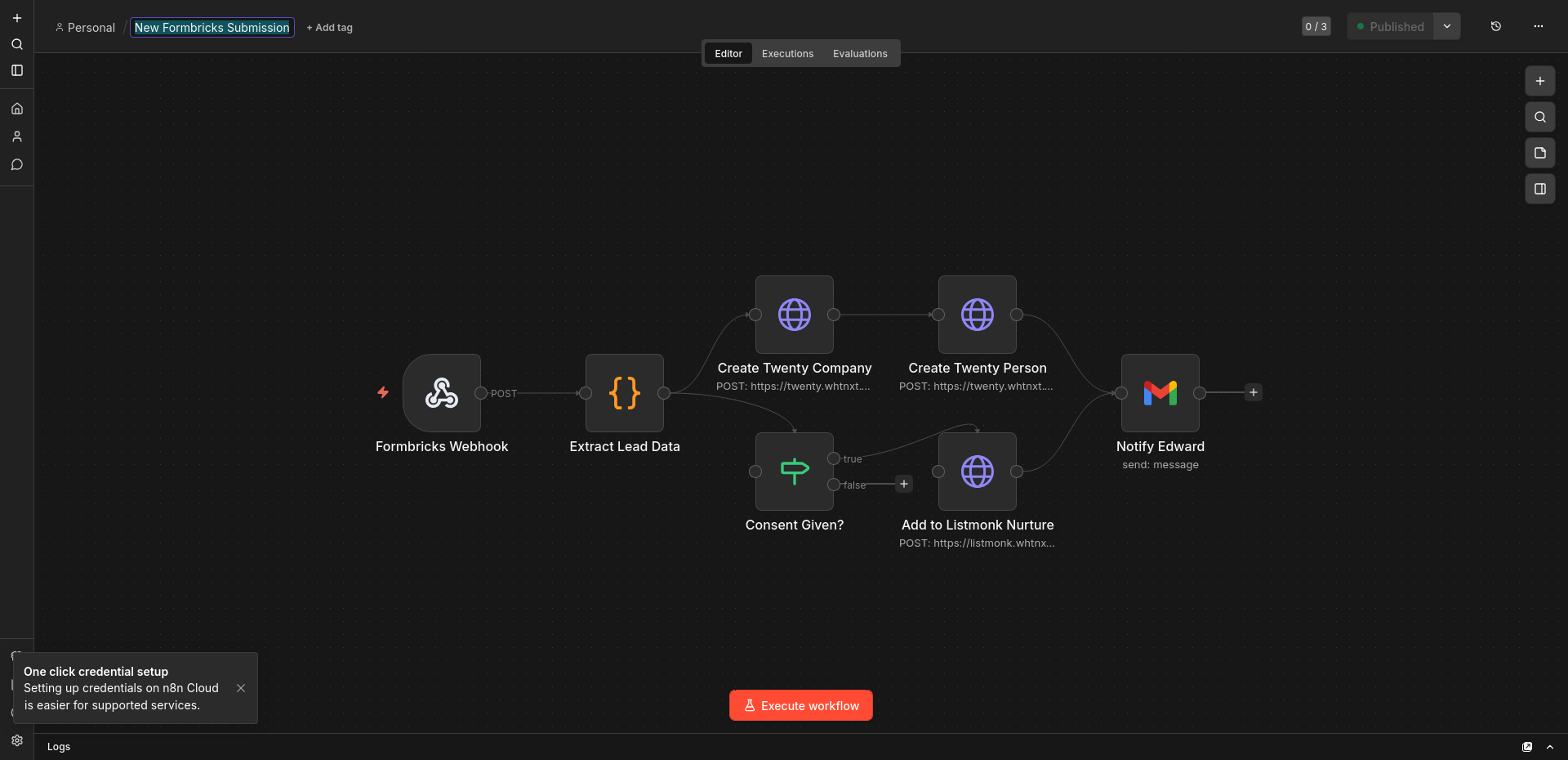
The first workflow I built was lead intake. Here's the path:
- Formbricks captures the submission. A webhook fires immediately.
- n8n receives it, deduplicates against existing contacts, and runs a validation check.
- Twenty CRM gets a new contact record, tagged with source and timestamp.
- Listmonk adds the contact to the appropriate email list if they consented.
- Telegram pings my phone with a summary. I know a lead came in before the visitor has finished reading my thank-you page.
This is not a theoretical pipeline. I use it for my own agency and for client work. The same pattern scales: one Formbricks form per property, all routing through the same n8n instance, each creating records in the right CRM workspace.
Why Self-Hosted Wins
The guides all say n8n Cloud is beginner-friendly. They're not wrong. But beginner-friendly often means designed for someone who wants to connect two SaaS tools they don't control. If you're building a marketing operation you actually own, self-hosted is the beginner move.
Data ownership is the obvious benefit. Your workflow logs, your contact data, and your execution history sit on hardware you control. But there is a less obvious one. Composability.
Because n8n is in the same Docker network as everything else, it can reach services that don't even have public APIs. My Qdrant vector database has no external port open. n8n talks to it anyway, over the internal network. Same with my Ollama instance for local LLM inference. You can't do that with n8n Cloud. You'd need a public API, authentication, rate limits, and a new dependency to maintain.
The Real Cost
I pay for the Mac Mini once. I pay for the electricity. That's it. n8n's community edition is free. Postgres is free. The Cloudflare tunnel is free. The reverse proxy is free.
The SaaS stack equivalent runs well into four figures annually for a small team. Think n8n Cloud plus HubSpot, Mailchimp, Typeform, and Zapier connectors. And every one of those tools is trying to upsell you.
Self-hosting isn't free. You pay in setup time and maintenance. But you pay once, not forever. And the skills you build (Docker, reverse proxies, container networking) transfer to everything else you're running.
What I Broke So You Don't Have To
I have been running this stack for a while. Here are four failures that cost me hours, in the order I hit them.
Docker networking gotcha: n8n could not reach Postgres. I deployed n8n and Postgres in the same Docker Compose file. They should have talked to each other automatically. They didn't. The reason was that I had n8n on the default bridge network and Postgres on a named network I created for another project. Docker containers only resolve hostnames on the same network. I fixed it by putting both services on the same named network in the Compose file. Took me two hours of reading logs that said connection refused before I checked the network list. I wrote a full breakdown of this n8n silent failure with the exact Docker Compose configuration that fixed it.
The Cloudflare tunnel cache problem. I added a new n8n webhook path and tested it with curl. It returned a 404. I checked the tunnel config, the reverse proxy, the n8n route. Everything looked right. The issue was Cloudflare's edge cache. The tunnel had cached the old route table. A hard refresh didn't help because the cache is on Cloudflare's side, not the browser. I had to add a Page Rule to bypass cache on the n8n subdomain. Twenty minutes of debugging a problem that wasn't in my infrastructure at all.
Credential rotation and the broken workflow. I rotated my Gmail OAuth token for security. n8n stores credentials separately from workflows. What I missed: the credential ID in my workflows still pointed to the old token. The workflows ran silently. No error. No email sent. No alert. I only noticed because a client asked why they hadn't received their weekly report. Now I version my credentials in n8n and tag them with expiration dates in my calendar.
The n8n database migration that wasn't. I upgraded n8n from 1.0 to 1.1. The release notes mentioned a database migration. I backed up Postgres, ran the upgrade, and n8n started fine. Three days later, a workflow failed with a foreign key constraint error. The migration had partially run. Some tables updated. Others didn't. The fix was restoring from backup, running the migration manually with the n8n CLI, and verifying every table before declaring it done. I now snapshot the Postgres volume before any n8n upgrade, not just the data directory.
These are not abstract warnings. They are the specific failures that happened on my Mac Mini, in my Docker stack, with my credentials. Self-hosting is cheaper. It is also yours to fix when it breaks.
SaaS vs. Self-Hosted: The Real Numbers
Here is the cost comparison for a small marketing team running the stack I described.
| Cost | SaaS Stack | Self-Hosted Stack |
|---|---|---|
| Automation platform | n8n Cloud: ~$240/yr | n8n Community: $0 |
| CRM | HubSpot Starter: ~$540/yr | Twenty: $0 |
| Email marketing | Mailchimp Essentials: ~$360/yr | Listmonk: $0 |
| Forms | Typeform Plus: ~$420/yr | Formbricks: $0 |
| Reverse proxy | Cloudflare Pro: ~$240/yr | nginx-proxy-manager: $0 |
| Tunnel | Cloudflare tunnel: $0 | Cloudflare tunnel: $0 |
| Hosting | Included in SaaS prices | Mac Mini: ~$600 one-time |
| Electricity | Included in SaaS prices | ~$50/yr |
| Year 1 total | ~$1,800 | ~$650 |
| Year 2 total | ~$1,800 | ~$50 |
| Year 3 total | ~$1,800 | ~$50 |
The numbers are approximate. Your SaaS prices vary by deal size and negotiation. Your self-hosted hardware costs depend on what you already own. The pattern is consistent: the break-even point is somewhere in month six, and the gap widens every year after.
There is a hidden cost in the SaaS column. Every tool in that stack is designed to expand. HubSpot will email you about Sales Hub. Mailchimp will suggest Premium. Typeform will push you to Business. The self-hosted stack has no upsell. The only person trying to sell you more is yourself.
Getting Started
If you're starting from scratch, the setup looks like this:
- Install Docker on a machine you control. A Mac Mini works. A used mini-PC works. A Synology NAS works if you can handle the AVX2 gotcha with some containers.
- Deploy n8n via Docker Compose. One container for n8n, one for Postgres, one for the reverse proxy.
- Point a Cloudflare tunnel at your reverse proxy. One subdomain per app.
- Configure your first workflow. Start with something small (a form submission that emails you). Prove the pipeline works end-to-end.
- Add tools one at a time. CRM next. Then email. Then the alert layer.
The mistake is trying to build the entire stack in one weekend. I didn't. I started with one webhook and one email. Each tool I added (Twenty, Listmonk, Formbricks) made the next tool more useful because they all connect through the same hub. If you want to see another n8n pipeline in action, I built a Reddit lead generation workflow that follows the same composable pattern — webhook in, process, CRM out.
If I were starting today, I'd build the lead intake pipeline first. Not because it's the most complex workflow, but because it's the one that generates the most organizational value with the least moving parts. One form. One webhook. One contact record. One notification.
Everything else (nurture sequences, lead scoring, content distribution) layers on top of that foundation.
I believe the best marketing automation is the one you fully control. Not because SaaS is evil. Because ownership compounds. Build the composable stack first, and the automation engine becomes the natural center of it.