How to build a coding agent that runs on your own machine (and why you'd want to)
A practical guide to a local, loop-driven coding agent: the one-brain-plus-small-specialists shape, the five rules that make it work, and how to stand it up on your own hardware.
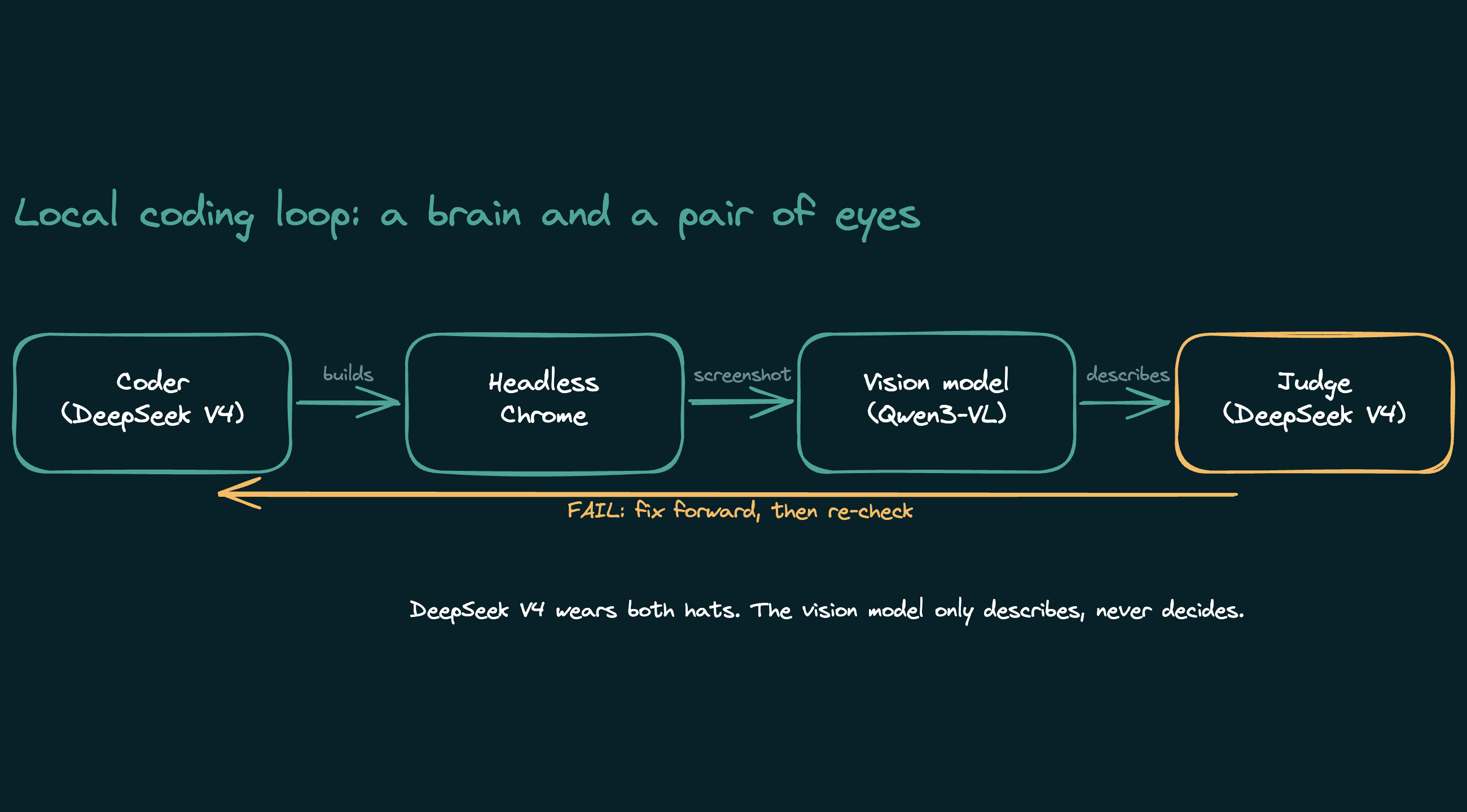
In the last post I stress-tested a coding agent that runs entirely on a Mac in my office. No cloud API, no per-token bill, no code leaving the building. This post is the build: the shape of the loop, what each piece does, and why it is put together this way. You can copy the pattern with whatever local models you can run.
First, why bother when the cloud models are excellent and cheap.
- Cost is fixed, not per-token. An autonomous loop fires dozens of model calls per task. On a metered API that adds up. On your own hardware the marginal cost is electricity.
- Your code never leaves. For client work or anything sensitive, that is not a nice-to-have.
- You control the whole stack. No rate limits, no model deprecations, no "the API changed." It runs at 3am whether or not anyone else's servers are up.
The trade is real: local models are smaller and you do more of the engineering yourself. The point of this post is that the engineering is mostly about giving each model a job it cannot fumble.
The shape: one brain, a few small specialists
The mistake is to grab the biggest model that fits and ask it to do everything. The setup that actually works is a strong generalist that does the thinking, plus small specialists that each do one narrow thing and stay far away from any decision they would get wrong.
Four roles, and only the first two are big models:
- The orchestrator. Reads the task, decides what to do, delegates, reviews the result, makes the calls. This is your strongest local model.
- The coder. A fresh sub-agent that implements one task end to end, runs the tests, and reports back. It starts with a clean context every time, so the orchestrator's chat stays small.
- The describer. A tiny vision model whose only output is a plain description of a screenshot. It never gives a verdict.
- The judge. Usually the orchestrator again, reading the describer's notes against the spec and deciding pass or fail.
The five rules that make it work
Everything I learned the hard way reduces to five rules. They are also the "why" behind each design choice.
1. Never let a small model judge. Let it describe. Ask a small vision model "does this pass," and it rubber-stamps. Ask it "what do you see," and it reports the truth. So the describer only describes, and a stronger model reads those facts and decides. Split perception from judgment and each model does what it is actually good at.
2. Don't trust the agent's report. Check it. A local coder will tell you the tests pass. Sometimes they do not. The orchestrator reads the actual diff and runs the actual test gate itself, every time. The report tells you where to look, not whether the work is done.
3. Give a reasoning model room to think. Newer models reason before they answer, and that reasoning eats output tokens. Cap the output too low and the model spends its whole budget thinking and never writes the code. This cost me a full day of believing a model was bad at a task when it was just being cut off. Set a generous output limit.
4. Mind what fits in memory. A big coder and a big vision model will not co-reside on a normal machine. Loading both at once filled my memory, pushed everything to swap, and locked the box. Pair your big coder with a genuinely small vision model, and check the totals before you load.
5. A screenshot is half a check. One desktop render misses two whole classes of bug: anything that breaks on mobile, and anything that throws a console error while looking fine. Capture two viewports, desktop and phone, and pull the browser's console and network logs in the same pass. It costs almost nothing and roughly triples what you catch.
The models I actually run, and why
Three models, one job each.
The coder and the judge: DeepSeek V4 Flash. This is the brain. It writes the code, reviews its own diff, and makes the pass-or-fail calls. I chose it over a larger model because in a loop, two things matter more than raw intelligence: clean tool-calling and speed. It calls tools reliably without derailing, runs about twice as fast as the bigger model I tested, and spends a fraction of the tokens per task. It runs locally through an aggressive 2-bit quant, which is the only way a model this size fits on my hardware at all.
The backup coder: Qwen3.6-27B. When the DeepSeek engine is not running, this is the fallback. It writes equally correct code, just slower, and it is worth having a second model the loop can drop down to.
The eyes: Qwen3-VL, a 3GB vision model. Its only job is to look at a screenshot and report what is on it. It is small on purpose. The coder already takes most of my memory, so the describer has to be tiny enough to sit beside it. And since it never judges, it does not need to be clever. It needs to be observant.
The rule under all three: fit the model to the job, not the job to the biggest model.
The harness: what turns a model into an agent
A model on its own just returns text. To make it an agent you need a harness: the layer that hands the model its tools, runs the read-act-read loop, and manages subagents. People skip past this part, but it is where most of the real engineering lives.
I run pi, a local-first coding agent runtime, for two reasons. It points at local model endpoints instead of a cloud API, so the entire loop stays on my own hardware. And it supports subagents, which is the piece that makes the whole thing affordable. I spawn a fresh coder for one task, it works in its own clean context, and only its final report comes back to the orchestrator. The orchestrator never has to hold the coder's hundreds of tool calls in its own head.
In practice the orchestrator runs in the harness on the strong model. When it delegates, it spawns a coder subagent on the same model that does one task end to end and reports back. For a visual check it runs a small script that screenshots the page and asks the vision model to describe it, then judges that description itself. The harness is what makes "delegate, review, repeat" an actual program instead of a diagram. The same loop runs in other harnesses too, like Claude Code or Anthropic's Agent SDK. The pattern is the point, not the tool.
The hardware and the wiring
None of this is exotic, but the layout matters.
The models run on a Mac Studio with 96GB of unified memory. That number is the real constraint of the whole project. It is what lets an 81GB coder and a 3GB vision model live in memory at the same time, and it is exactly why the vision model has to be tiny. The Studio does one thing, serve models, behind a standard chat-completions endpoint.
The agent runs on a different machine. It reaches the model endpoint across my home network through an SSH tunnel, so the inference server is never exposed past the machines that actually need it. That separation is on purpose. The inference box stays a dumb, dedicated appliance, while the agent, the editor, and the actual code live somewhere else. Headless Chrome runs next to the agent.
If you are doing this on a single machine, collapse all of it onto that one box. The split is a convenience for me, not a requirement of the design.
Standing it up
You need four things, none exotic:
- A local inference server that speaks the standard chat API, like LM Studio or Ollama. Anything works as long as your code can POST a prompt and get a completion.
- A capable coder model. Pick the strongest one that fits your hardware with room to spare for the vision model. Benchmark it on your own tasks before you commit (here is how I ran mine), and run that benchmark with a generous token limit and a generous timeout, or you will measure the harness instead of the model.
- A small vision model for the describer. It needs to read a screenshot and report what is on it. It does not need to be smart enough to judge, because it never will.
- Headless Chrome for the screenshots, driven by a small Puppeteer script that captures a desktop and a mobile viewport and collects the console. Use a fixed viewport, not full-page capture, or horizontal overflow quietly stops looking like overflow.
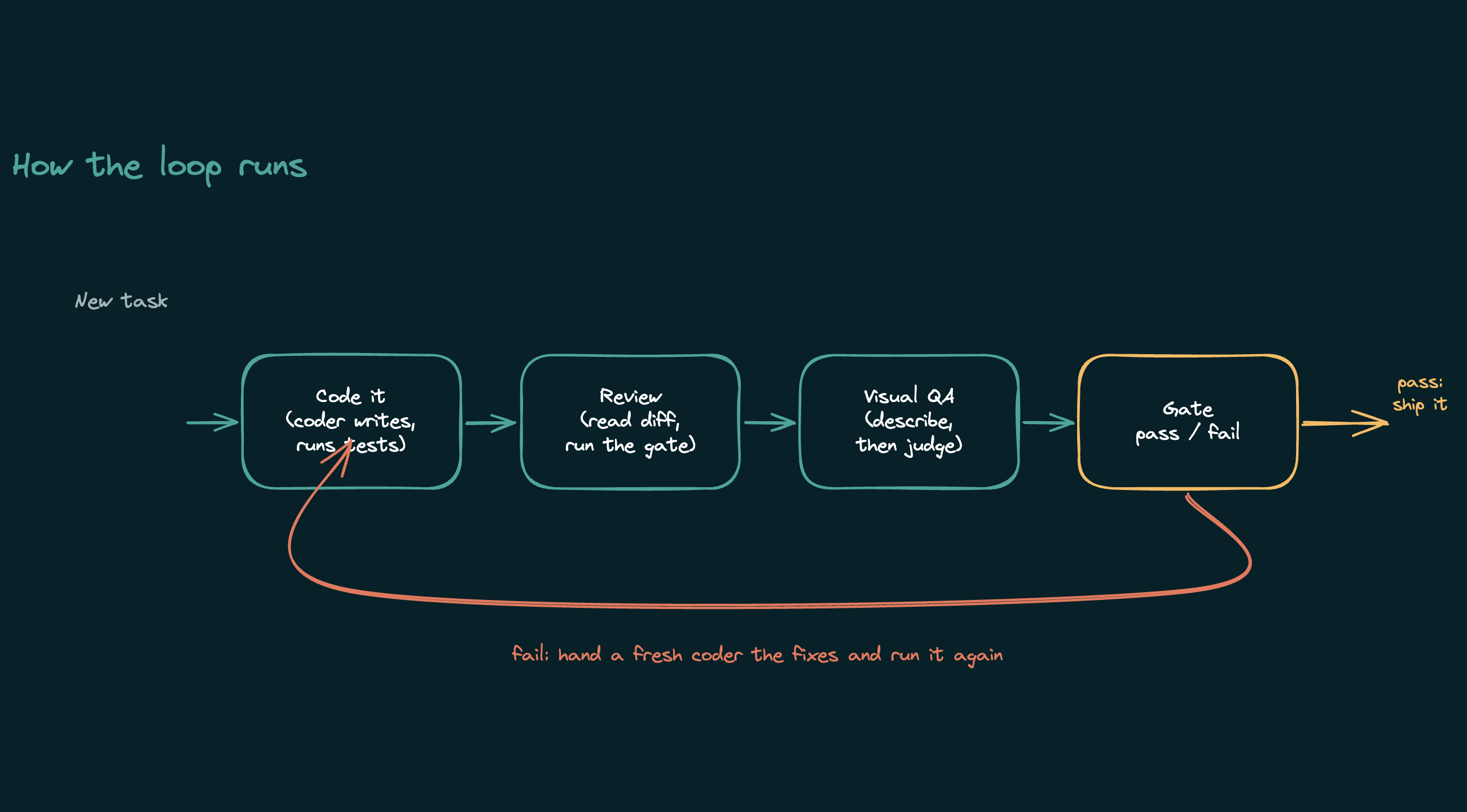
The loop itself is short, and it is the same shape Anthropic documents in their Agent SDK. Classify the task. If it touches UI, write a design spec first. Hand the coder a complete, self-contained brief and let it work. Review the diff and run the tests. For UI work, screenshot the result, have the describer report it, and judge that report against the spec. On failure, hand a fresh coder the specific fixes and go again, a few rounds at most. Nothing commits until you say so.
The honest limits
This is not a fire-and-forget overnight robot yet, at least not in my setup. It runs attended, with me at the keyboard kicking off tasks and reading results. The local models are weaker than the frontier, so the wins come from scoping each job tightly, not from raw intelligence. And the visual judgment is only as good as your spec: the describer reports the facts faithfully, but if your spec does not say "four columns, visible on mobile," nothing fails the two-column phone render.
What you get in return is a coding agent that costs nothing per run, keeps your code on your own disk, and does the well-specified middle of the work reliably while you handle the open-ended ends. For a lot of real work, that is the trade worth making.