How I Built a Repeatable PPC Audit Pipeline That Runs in 2 Hours
Most demand gen teams treat competitive intelligence as a quarterly exercise. I built a four-stage pipeline that produces a prospect audit in two hours using DataForSEO, on-page crawlers, and Claude Code.
Most demand gen teams treat competitive intelligence as a quarterly exercise. They buy the subscription, run the report, file it. I got tired of that, so I built a pipeline that produces a four-page prospect audit in two hours. Here is how it works.
What the Pipeline Actually Does
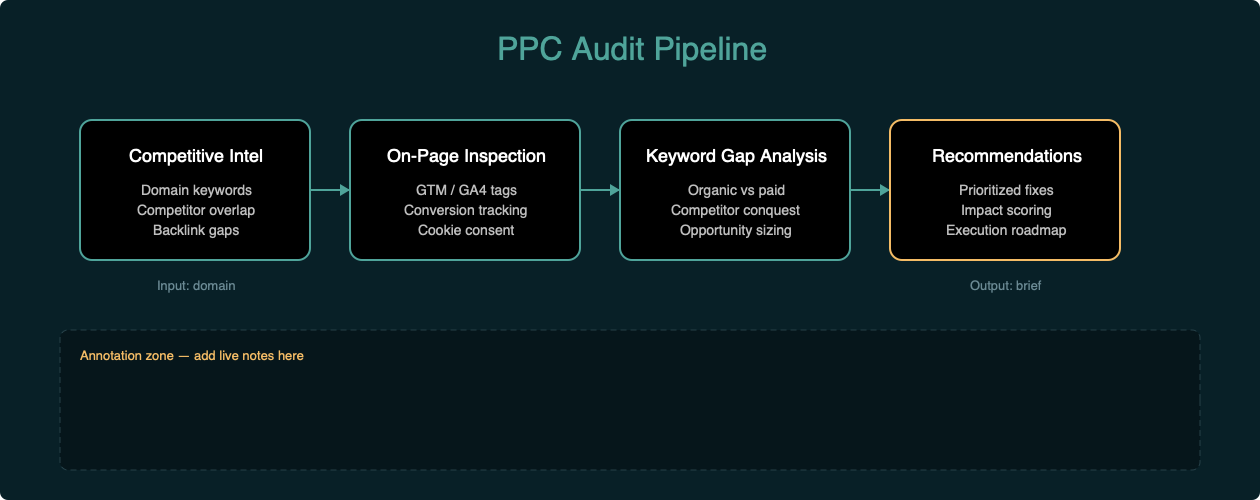
The system has four stages:
- Competitive intelligence. Pull domain-level keyword data, competitor overlap, and paid search estimates from DataForSEO.
- On-page inspection. Curl the homepage and landing pages, grep for tracking IDs. GTM containers, GA4 measurement IDs, Google Ads conversion tags, Facebook Pixel, HubSpot scripts, OneTrust. Takes about five minutes.
- Synthesis. Feed the raw data into Claude Code. It identifies patterns -- keyword gaps, tracking omissions, structural issues -- and frames them as business problems with specific recommendations. The tool pulls the data. The model connects the dots.
- Output. A styled HTML template renders to PDF via WeasyPrint. Reusable across audits. Change the inputs, get a new brief.
Each stage is repeatable. The inputs change, but the logic doesn't.
What You Need
- A DataForSEO account (API credits run about $0.05-0.10 per call)
- curl (preinstalled on macOS and Linux)
- Claude Code or any AI assistant with tool access
- WeasyPrint for PDF rendering (
pip install weasyprint) - About two hours
Stage 1: Pull Competitive Intelligence
I query domain keywords, competitor overlap, and backlink summaries through the DataForSEO API. The output is structured JSON with positions, search volumes, CPCs, and traffic estimates.
For a typical audit, I pull:
- Top organic keywords by search volume
- Top paid keywords with estimated CPC and traffic share
- Domain competitors ranked by keyword overlap
- Backlink summary for authority context
This gives me the competitive landscape in about ten minutes.
Stage 2: Inspect the Tracking Stack
A simple curl to the homepage and key landing pages, grepped for tracking IDs:
curl -s "https://example.com/" | grep -oE '(GTM-[A-Z0-9]+|G-[A-Z0-9]+|AW-[A-Z0-9]+|fbq|pixel|hotjar|clarity|_hj|OneTrust|hbspt|hubspot)'I check for:
- GTM container (most companies have this)
- GA4 config tag (often missing -- configured through GTM only, no hardcoded fallback)
- Google Ads conversion tag (critical for any company spending on paid search)
- Enhanced conversions (Google's #1 recommendation for lead gen)
- Facebook Pixel (retargeting, lookalike audiences)
- Cross-domain auto-linking (breaks attribution between subdomains)
- Session recording tools (Hotjar, Clarity)
- HubSpot tracking and forms
- OneTrust cookie consent
This takes about five minutes and tells me more about how well they actually track conversions than most discovery calls.
Stage 3: Synthesize the Findings
The raw data and crawl results feed into Claude Code as the analysis layer.
Here's what that looks like in practice. I paste the competitive data and crawl results into a conversation, then ask Claude to identify:
- Which high-intent organic terms they rank for but don't bid on
- Whether their paid search competitors are actually active
- What's missing from their tracking stack
- Whether landing pages match search intent
- Whether ad copy is differentiated by intent stage
The model connects the dots. It flags that a company spending $14K monthly on paid search has no conversion tag visible in their source code. It notices that a company bidding on competitor brand terms lands users on generic product pages. It spots that the same three messaging themes repeat across all ad copies regardless of intent stage.
This is where the insight happens.
Stage 4: Render the Brief
A styled HTML template with findings, tables, and recommendations renders to PDF. The template is reusable. Change the inputs, get a new brief.
I use WeasyPrint for this because it handles CSS page breaks, tables, and styled callout boxes better than the alternatives I tried. The first version used fpdf2 and broke on unicode characters. The second tried pandoc and required a LaTeX engine I didn't have installed. WeasyPrint was the third attempt and it worked.
What the Analysis Surfaces
Here's the hierarchy of findings the pipeline almost always produces:
Tracking gaps are the highest-leverage miss. Without proper conversion tracking and cross-domain attribution, companies can't tell which paid keywords actually convert. That's the blind spot. Right where ad spend meets revenue.
Keyword gaps are typically the second-highest leverage. Companies rank organically for high-intent, high-CPC terms they don't bid on. If you're at position 6-10 organically for a $40+ CPC term, you're capturing 3-5 percent of clicks. A paid ad in position 1-3 alongside that organic listing captures the above-fold traffic you're already paying to be visible for -- just not in paid.
Landing page mismatch is the third. Companies bidding on competitor brand terms almost always land users on generic product pages. No dedicated comparison pages. No head-to-head feature tables. Just a "we're great" page that doesn't match the search intent.
Ad copy redundancy is the fourth. The same three messaging themes repeated across brand defense, category awareness, and competitor conquest. No differentiated copy by intent stage.
Each of these is a business problem, not a data problem. The pipeline surfaces them fast so you can decide what to fix first.
My Real-World Stack
Here's what the pipeline looks like in practice.
I run it before sales calls to understand a prospect's competitive position. I run it after product launches to see how messaging changes are showing up in search. I run it as a monthly health check for clients who want to know what their competitors are doing differently.
The output isn't a spreadsheet. It's a brief with specific, prioritized recommendations. Here's the hierarchy I use:
- Quick wins (1-2 weeks): fix tracking, add missing tags, configure cross-domain linking
- Medium-term (1-2 months): launch campaigns on keyword gaps, create competitor comparison pages
- Long-term (2-3 months): build full attribution, implement offline conversion import, set up automated bidding
This framework works across industries. I've run it against SaaS companies, real estate platforms, professional services firms, and e-commerce stores. The specifics change. The pattern doesn't.
A Few Things to Know Before You Commit
The data is directional, not exact. Competitive intelligence tools estimate search volume, CPC, and traffic based on their own models. Treat the numbers as signals, not financial statements. The trends and relative positions matter more than the absolute values.
On-page inspection has limits. If a company runs server-side tracking or loads tags through a consent management platform that delays execution, you won't see everything in a source code crawl. What you do see is still valuable -- it tells you what happens when tags fail to fire.
This doesn't replace account access. The pipeline gets you the surface in two hours. The operational layer requires actual Google Ads and GA4 access. That's where you build full attribution, implement offline conversion import, and set up automated bidding based on CRM deal stage data.
The synthesis layer is the bottleneck. The competitive data and crawl results are commodity. The insight comes from framing the findings as business problems. That requires a model that understands demand generation, not just SEO. Claude Code handles this well because it has tool access and can verify its own assumptions by pulling additional data mid-analysis.
The Alternative I Walked Away From
The first version of this pipeline was a mess.
I tried to automate everything. Full SERP scraping. Screenshot comparison. Lighthouse scores. Social sentiment analysis. Competitor backlink deep-dives. It took six hours and the output was unreadable. Too much data, not enough insight.
So I stripped it back. Focused on four questions:
- What are they bidding on?
- What are they missing?
- What's broken in their tracking?
- What would I fix first?
That's it. Everything else is noise.
The other thing I learned: the technical stack doesn't matter. You could build this with SEMrush, Python, and Google Docs. What matters is the decision framework -- the hierarchy of findings that lets you go from raw data to prioritized action in under an hour.
What Account Access Unlocks
This analysis is based on publicly available data. With actual Google Ads and GA4 access, the next layer is building full attribution. Connecting form submissions to keyword data. Implementing offline conversion import from lead to closed deal. Setting up automated bidding based on CRM deal stage data.
That's the difference between a surface audit and an operational system. The pipeline gets you the surface in two hours. The operational layer is what you build next.
I'm still deciding whether the tracking gap or the keyword gap is the bigger miss. Depends on the account. But I've never run this against a company spending five figures on paid search and found nothing worth fixing.